RC Electric Car SFHSS Receiver MR4SB Compatible FUTABA S-FHSS #MR4SB
Regular price
$68.00
RC Electric Car SFHSS Receiver MR4SB Compatible FUTABA S-FHSS #MR4SB
Compatibility:
MOTIVE-RC 2.4GHz S-FHSS Compatible Receiver is designed to use with FUTABA S-FHSS 2.4GHz transmitters, such as surface system T3PV, 4PLS, T4PX, T4GRS, T4PM, T4PV, T7PX, T10PX or air system T4YF, T6J, T6K, T8J, T10J, T14SG, T18MZ, T18SZ under S-FHSS protocol mode.
Feature:
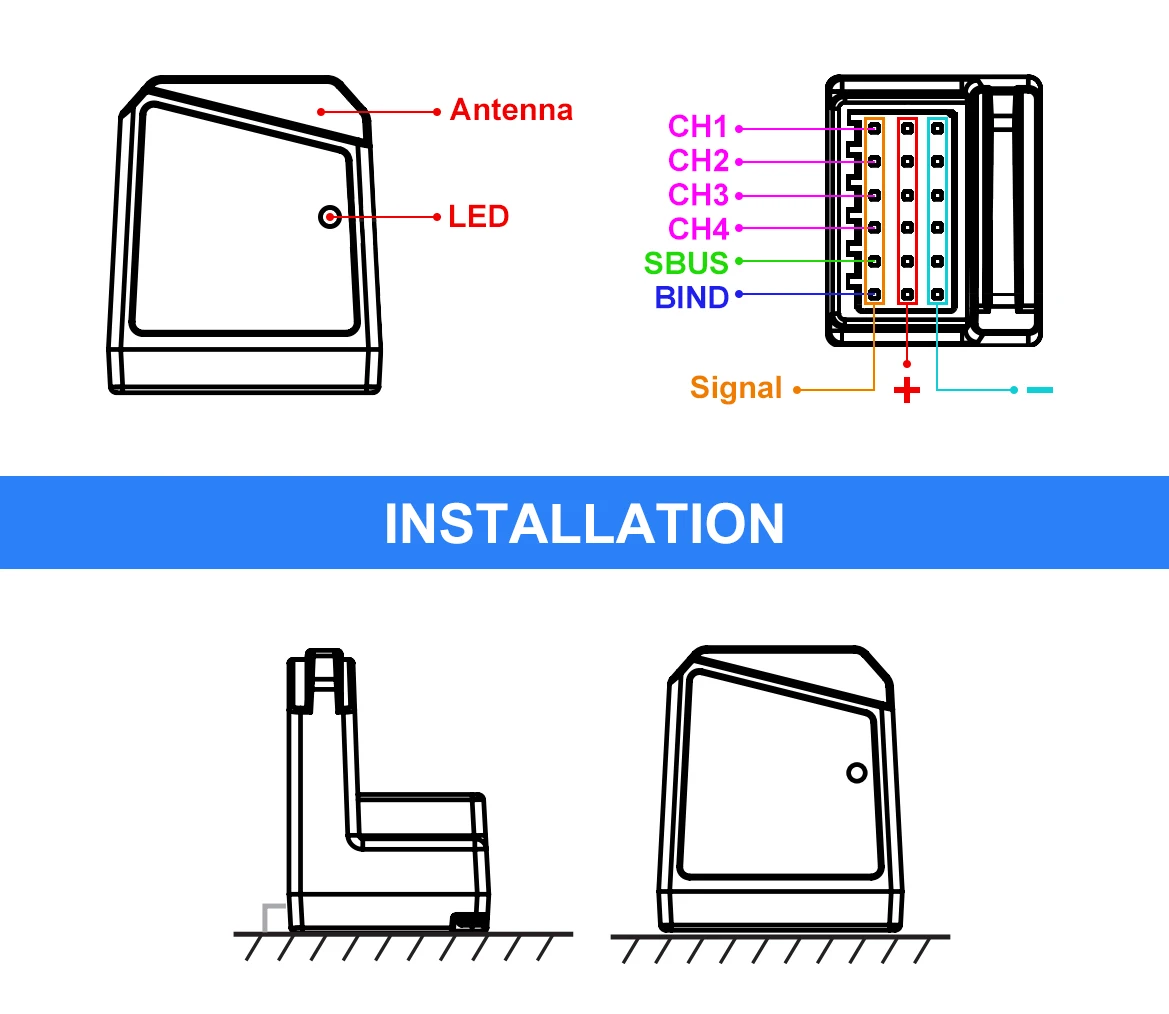
- 4ch servo channels on CH1~CH4
- S.BUS output support expanding servo channels
- Normal mode and High Speed mode.
- Support Fail-safe function on all channels
Specifications:
- Model Type: RC Car/Boat
- Operating Current: 40mA max and 20mA under linked
- Antenna: Onboard antenna
- Operating Voltage: 3.6~8.5V
- Operation temperature: - 10~70 degC
- Weight: 5g(MR4SB), 7.2g(MR4SF), 1.2g(MR4SM)
- Size: 26x22x17.3 mm(MR4SB), 20.5x18.5x28.8 mm(MR4SF), 18.8x12.5x6 mm(MR4SM)
Bind procedure:
MR4SB/MR4SF:
1. Insert the bind cable into the receivers “BIND”channel, plug the power cable into any other channel.
2. Turn on the S-FHSS transmitter, leave it 0.5M~1M away the receiver.
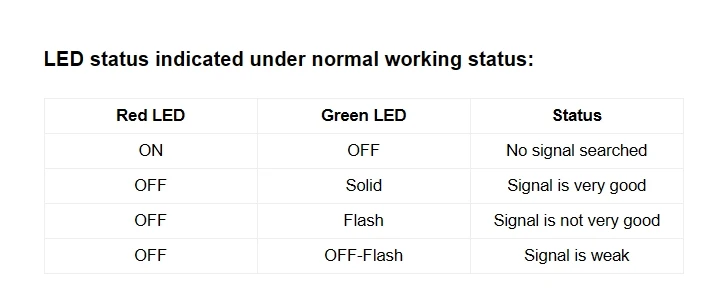
3. Red LED light on and Green LED off when searching signals, and turn to Green LED light on and Red LED off indicate bind is succeeded.
4. Remove the power and bind cables from the receiver, reconnect the power cable to the receiver.
5. Check to make sure that the transmitter and receiver are working as expected, if there are any issues or unexpected operation follow the steps above to bind again.
MR4SM:
1. Connect the battery to the receiver while pressing receiver's BIND button.
2. Turn on the S-FHSS transmitter, leave it 0.5M~1M away the receiver.
3. Red LED light on and Green LED off when searching signals, and turn to Green LED light on and Red LED off indicate bind is succeeded.
4. Remove the power from the receiver, reconnect the power cable to the receiver.
5. Check to make sure that the transmitter and receiver are working as expected, if there are any issues or unexpected operation follow the steps above to bind again.
Fail-safe setting:
Receiver set failsafe on the S-FHSS transmitter just like the operation of the FUTABA receivers if the feature exist. We highly recommend you set failsafe feature while driving your models. An example of a useful failsafe setting would be to shut down the model's throttle, so that it does not drive away uncontrolled.
High Speed/ Normal mode switch guide:
The "Normal mode" accepts any type of servos or the peripheral. The "High Speed mode" only accepts the digital servos, including BLS series, and most peripheral equipment such as the brushless ESC. Please pay special attention to the information contained within this manual and transmitters manual in order to have a pleasant running experience.
If your receiver has been linked with your transmitter, please power off your transmitter. When your receiver's LED light red, insert the bind cable into the receivers “BIND”channel for more than 6 seconds but no longer than 10 seconds. Remove the bind cable and you will see the green LED blinking slowly.
Now insert the bind cableagain, and the receiver will first blink the red LED and then turn off, followed by the green LED blinking. (Pay attention to the speed of the green LED flashing, as this indicates the receiver's working mode).
When the green LED blinks slowly, it means the receiver has switched from high-speed mode to normal mode; when the green LED blinks quickly, it means the receiver has switched from normal mode to high-speed mode.
After about 6 seconds, the green LED will turn off, and the red LED will stay on, indicating that the mode switch is complete.
Note:If you want to reset the receiver to normal mode, you can rebind the receiver to the remote control.
LED status indicated under normal working status:
Channel definition:
MR4SB: